3D Bee Tiered Tray Decor Bundle: Graphics and Laser Engraving
When I first pulled up the preview files for the 3D Bee Tiered Tray Decor Bundle, my immediate reaction was a mix of nostalgia and strategic calculation. As someone who has spent years optimizing listings on Etsy and Creative Fabrica, I don’t just look at whether a design is "cute." I look at its commercial viability. Does it have enough visual weight to stop a scroll? Is it versatile enough to be adapted across multiple product types without feeling forced? This bundle hits that sweet spot between rustic charm and modern farmhouse aesthetics, making it a strong candidate for seasonal collections, particularly around spring and summer.
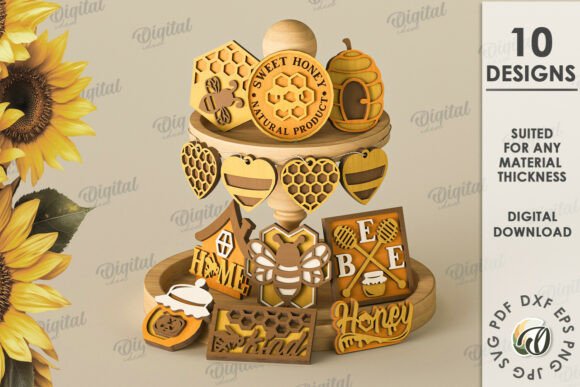
It is crucial to clarify right from the start what we are working with. The product description explicitly states: This is a digital product. No physical goods will be sent – The photos are intended only for inspiration. A zip folder with 10 designs in SVG, DXF, PNG, and PDF formats. For any seller, this distinction is vital. You are buying a license to use these vector and raster files, not a pre-made tiered tray to ship to a customer. Understanding this workflow is the first step in turning this asset into profit.
First Impressions and Niche Appeal
The visual personality of this bundle leans heavily into the "modern rustic" category. Bees are inherently playful, but when rendered in clean vector lines suitable for laser engraving or vinyl cutting, they take on a more sophisticated, decorative role. The mood is warm, inviting, and slightly whimsical. It appeals strongly to buyers who enjoy home decor, specifically those interested in kitchen organization, farmhouse styling, and handmade gifts.
From a branding perspective, this asset feels premium yet accessible. It isn’t overly complex, which means it translates well to various mediums. Whether you are targeting busy moms looking for printable wall art or crafters building a Cricut project library, the aesthetic is broad enough to cast a wide net while remaining specific enough to stand out in search results. The color palette suggested by the mockups—yellows, blacks, and whites—is high-contrast and easy to read, even at small sizes.
Real-World Product Applications
So, how do we turn these ten designs into sellable products? Let’s imagine I am preparing a new shop collection focused on "Spring Home & Kitchen." Here is exactly where I would deploy the 3D Bee Tiered Tray Decor Bundle.
- Laser Engraving Projects: Since the bundle includes DXF and SVG files, these are perfect for wood burning. Imagine selling unfinished wooden trays or cutting boards engraved with these bee motifs. The clean lines of the vector graphics ensure that the engraver captures every detail without blurring.
- Vinyl Decals and Stickers: These designs work beautifully as decals for mugs, tumblers, or laptop skins. Because the files are scalable, I can create a single large decal for a cooler or dozens of tiny sticker sheets for planners.
- Digital Downloads: I can convert the PNGs into printable wall art. By arranging three different bee illustrations in a cohesive grid, I can offer a "Kitchen Gallery Wall" set. This requires no shipping, offering pure profit margin after the initial upload.
- T-Shirt and Apparel Design: For print-on-demand platforms like Redbubble or Printful, these graphics can be placed on neutral-colored t-shirts, aprons, or tote bags. The graphic acts as a focal point, appealing to teachers, bakers, or anyone who loves nature-themed apparel.
- Canva Templates: If you sell social media templates, these bees can serve as consistent brand elements for beauty bloggers or lifestyle influencers who want a cohesive, organic look.
Strategic Product Presentation
In the crowded world of digital marketplaces, your listing images are just as important as the product itself. How you present the 3D Bee Tiered Tray Decor Bundle determines your click-through rate. I recommend creating mockups that tell a story rather than just showing the raw file.
Instead of a plain white background, place the design on a textured linen napkin next to a honey jar, or engrave it onto a rustic wooden slice. This contextualizes the product for the buyer. When customers see the design in a realistic setting, they can visualize the end result, which increases perceived value. Use these visuals to highlight versatility: show the same bee graphic on a mug, a tumbler, and a piece of paper to demonstrate cross-product potential.
Furthermore, organize your offerings into bundles. Don’t just sell one bee design; sell the entire "Honeycomb Collection." Bundles increase average order value and make your shop look more established. Ensure your thumbnails are crisp and legible. If the design is too intricate, simplify the background in your mockup to let the graphic breathe.
Where Caution Is Required
While this asset is versatile, it is not a one-size-fits-all solution. There are specific scenarios where this design might fail if not handled carefully.
Small Detail Risks: If you plan to use these designs for tiny sticker details (under half an inch), test the cut lines first. Intricate parts of the bee wings or antennae may become illegible or difficult to weed if printed on low-resolution printers or cut on cheap vinyl cutters.
Contrast Issues: Avoid placing these designs on dark backgrounds without adjusting the colors. If you are using black or dark yellow bees on a dark wood background, the contrast will be lost. Always test your designs on both light and dark backgrounds before publishing.
Complex Layouts: Do not overcrowd the design with too much text or additional clipart. The strength of this bundle lies in its simplicity. Let the bee be the hero. Overcomplicating the layout dilutes the visual hierarchy and makes the design look cluttered rather than curated.
Practical Seller Notes for Success
To maximize the utility of this graphic design asset, follow these practical steps before hitting publish:
- Test Mockups: Generate your own mockups using tools like Placeit or Canva. Seeing the design on a real product helps you identify scaling issues.
- Check File Integrity: Open the SVG files in your design software (like Silhouette Studio or Adobe Illustrator) to ensure all paths are closed and there are no stray nodes that could cause cutting errors.
- Verify Transparency: Ensure the PNG files have true transparent backgrounds. A white box behind your bee graphic will ruin the professional look of sublimation prints.
- Font Pairing: When creating digital products like greeting cards or quotes, pair the bee graphic with complementary fonts. A bold sans-serif font works well for modern looks, while a handwritten script adds a personal, handmade touch.
- Commercial License: Double-check the terms of service. Most digital bundles allow you to sell physical items made from them, but rarely allow you to resell the digital files themselves. Never share the zip folder directly with customers; instead, provide instructions on how to access the files or include them in a packaged download.
Ultimately, the 3D Bee Tiered Tray Decor Bundle is a solid addition to any digital creator’s toolkit. It offers the flexibility needed for laser engraving, vinyl cutting, and digital printing. By treating it as a foundational element for broader product lines rather than a standalone item, you can build a cohesive, professional online store that resonates with crafters and homeowners alike. Take the time to test, optimize your presentations, and respect the licensing terms, and this simple graphic can yield significant returns throughout the year.